
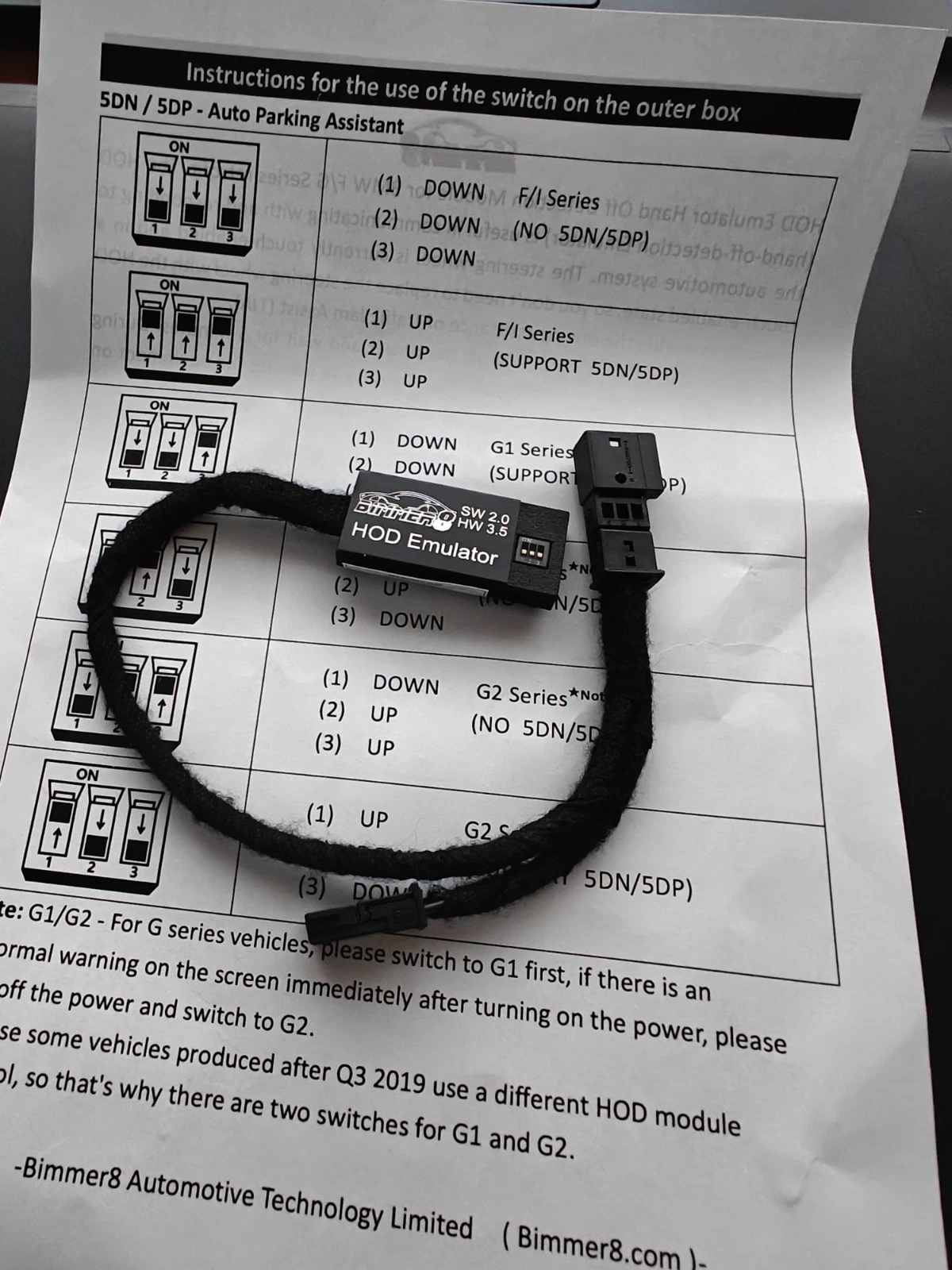
HOD Module for BMW F, G Series – Traffic Jam Assist (TJA) Hand Off Detection
£149.00
Description
Advanced Hand-Off Detection Emulator for BMW F/G Series Retrofitting
The HOD Emulator allows you to enable Traffic Jam Assist (TJA) without replacing the original steering wheel. It simulates constant hand contact with the wheel, making it possible to activate driving assistance features — especially useful in traffic — while keeping full compatibility with your car’s original systems.
✅ Key Features
-
Compatible with BMW F and G Series
-
No need to replace the steering wheel
-
Fully tested before shipping
-
Ideal for research and development use
🔧 Purchase Requirements
-
Your car must be equipped with KAFAS and ACC (5DF) systems, and your steering wheel must have the required buttons.
-
Not compatible with vehicles that have Active Steering (S217) or no EPS (Electric Power Steering).
-
This product is intended for testing and research purposes only. You must keep your hands on the wheel and focus on the road while driving.
-
This product requires coding — it is not plug & play.
-
No remote coding support is provided.
-
Incorrect or unfamiliar coding may prevent TJA from working — no refunds in such cases.
-
Each unit is tested before shipment to ensure full functionality.
🚘 Supported BMW Models
F Series
2′ F45 / F46 (incl. LCI) • 5′ F07 / F10 / F11 (LCI) • 6′ F06 / F12 / F13 (LCI)
7′ F01 / F02 (LCI) • i3 I01 (LCI) • X1 F48 / F49 • X2 F39 • X5 F15 • X6 F16
G Series
3′ G20 / G21 / G28 • 5′ G30 / G31 / G38 • 6′ G32 GT • 7′ G11 / G12 (LCI)
8′ G14 / G15 / G16 • M8 F91 / F92 • X3 G01 / G08 / F97 • X4 G02 / F98
X5 G05 • X6 G06 • X7 G07 • Z4 G29
⚠️ Important Notes Before Installation
-
Power off the vehicle and wait 5 minutes before installation. Do not open doors or operate the vehicle during install.
-
TJA is not autonomous driving. It’s intended only for low-speed traffic situations (recommended up to 60 km/h).
-
TJA only activates when a vehicle is detected in front.
-
Avoid using TJA in rain or fog.
-
Coding is required. If you’re not familiar with vehicle coding, consult a professional.
-
Modules to code (example for F-Series):
-
FEM or BDC
-
KOMBI
-
ICM or SAS
-
EPS
-
SZL (if applicable)
You can either modify the VO or code parameters manually.
-
-
The emulator does not interfere with the camera, lane-keeping, or adaptive cruise functions.
-
If your car already has a built-in HOD module, remove it before using this emulator — do not connect both systems!
-
In some cases, the parking assistant may be disabled, as it requires the driver to release the steering wheel.
-
We recommend updating your car’s modules to the latest I-Step software version.
-
If your vehicle already has TJA / LKA / 5AR / 5AT / 5AU, you only need to disconnect the original HOD sensor and connect this emulator — no FDL coding needed.
🎥 Watch in Action
-
HOD Emulator Live Test – BMW 520i F10 LCI
-
BMW Genius: Activating Driving Assist Systems
-
Lane Keep & TJA Explained – BMW Genius How-To
📦 Included
-
1x HOD Emulator Unit
-
Installation Guide (Digital PDF)
Related products
-
Wireless Phone Charger for BMW 3 & 4 Series (F30 F31 F32 F33 F34 F36) – Fast Charging for iPhone & Samsung
£54.99 Add to basket -
Sale!
 Original price was: £24.99.£19.99Current price is: £19.99.
Add to basket
Original price was: £24.99.£19.99Current price is: £19.99.
Add to basket
-

USB to AUX Adapter for Mercedes NTG 5.0, BMW – CarPlay / Android Auto Retrofit Cable
£29.98 Add to basket -
BMW F G series MPH SLI Speed limit info Emulator Adapter NBT EVO ENTRY 6WA 6WB
£99.00 Add to basket